Tell us what systems your dealership uses.
Dealership CRM Integrations
AutoRaptor Connects to the Tools Your Dealership Already Uses
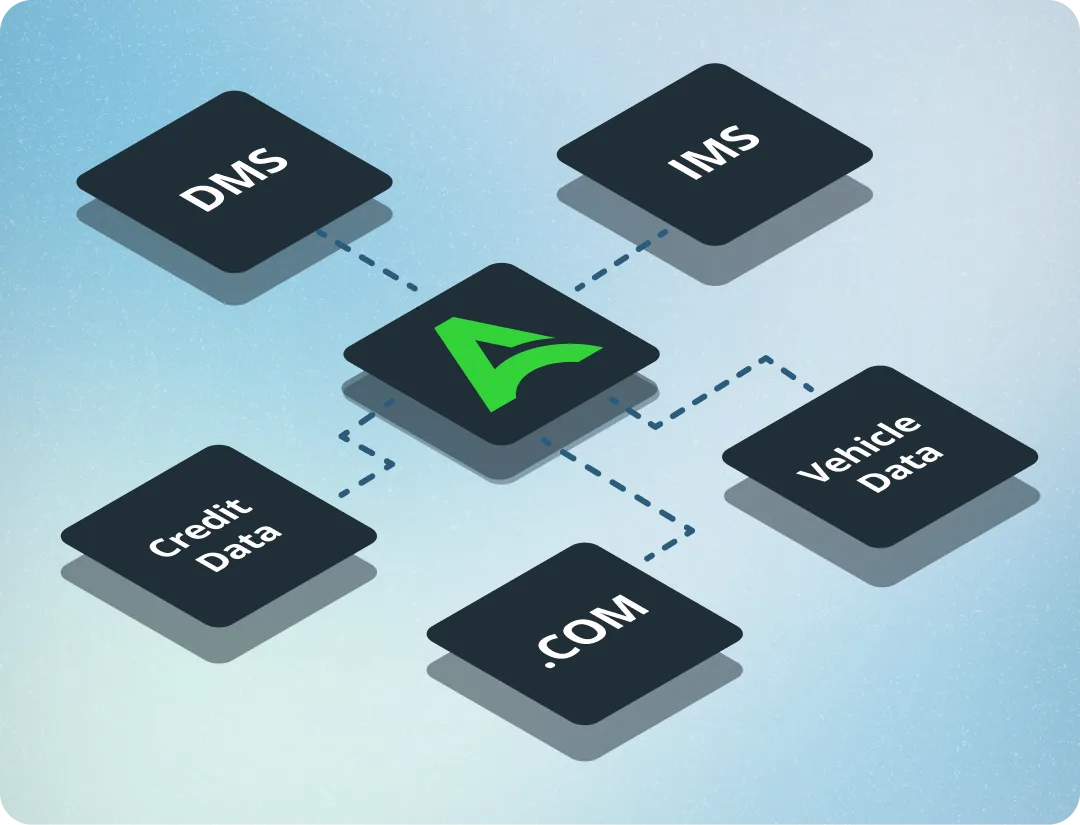
Your CRM should not create another silo. AutoRaptor connects your lead sources, DMS, inventory tools, credit platforms, vehicle history, and communication systems so data moves with your sales process.
See if AutoRaptor fits your dealership in 10 minutes.
Core capabilities
Every Integration Your Dealership Needs
Connect the systems your team already uses during onboarding, then let data flow automatically from day one.
Lead source integrations
Route leads from your website, OEM portals, marketplaces, and third-party lead providers into AutoRaptor automatically.
DMS integrations
Connect customer, deal, and dealership data between AutoRaptor and your DMS workflow.
Inventory integrations
Keep inventory and vehicle details connected to your CRM and sales process.
Credit and finance integrations
Support credit, deal, and F&I workflows with connected tools like Dealertrack and RouteOne.
Vehicle history integrations
Bring vehicle history context into your dealership sales process.
Your CRM Should Work With Your Stack
AutoRaptor is configured during onboarding so the tools your dealership relies on are connected before your team starts working leads.
Your onboarding specialist configures the connections.
Leads, inventory, and deal data start flowing automatically.
Your Integrations Are Configured During Onboarding
No dealership wants a stack that needs babysitting. AutoRaptor gets integrations connected as part of launch.
Tell us what you use
During onboarding, your AutoRaptor specialist identifies your DMS, lead sources, inventory tools, credit platforms, and related systems.
We configure the connections
Your onboarding specialist connects the tools directly so your data has a clear path into the CRM.
Data flows from day one
Once live, leads route in automatically, deals push to the right systems, and your team works from one CRM.
Connected workflow
One connected workflow. Clear next steps for every team.
80+
Lead source and dealership integrations.
1
Connected CRM workflow for your stack.
Day 1
Data flow configured during onboarding.
CRM
Your operation connected in one place.
Explore more AutoRaptor
Features that work even better together
If this feature fits how your dealership sells, these related tools can help your team connect the next step.
-
One CRM. Connected to Your Whole Operation.
Keep AutoRaptor connected to the systems that already run your dealership.
See reviews
4.6/5
1200+ reviews -
Chad Randash
Randash Auto Center, Owner
“We looked at and tried out a few different CRMs, but AutoRaptor does a great job with its simplicity. It works well, and it’s an easy process.”
-
Jesse Hellem
Owner of 615 Auto Sales
“I interviewed 10 different CRM companies, and I don’t see anyone else doing it quite like you guys are. One of the things I liked the most is that everything fell under the same umbrella: your CRM and AI fuse.”
Questions About AutoRaptor Integrations
Answers about DMS, lead source, credit, vehicle history, and onboarding integrations.
Automotive CRM platforms typically connect with lead providers, inventory syndication tools, and vehicle history services, so information flows in automatically instead of requiring manual entry. AutoRaptor's integrations are configured by your onboarding specialist, with no developer required.
The most valuable CRM integrations connect your lead sources, inventory listings, and vehicle history tools directly into the CRM. AutoRaptor brings these connections together, so every lead and vehicle update flows in automatically.
AutoRaptor's integrations are set up for you. Your dedicated onboarding specialist configures every connection during setup, so there's no developer or outside integration service to track down.
AutoRaptor can connect vehicle history and inventory context into dealership workflows through supported integrations.
Yes. AutoRaptor can receive leads from OEM portals and third-party lead sources so they land directly in your CRM workflow.
AutoRaptor supports DMS integrations for many dealership systems. Your onboarding specialist can confirm compatibility and setup details.
Integrations are configured during onboarding by your AutoRaptor specialist based on the systems your dealership uses.
Talk to the AutoRaptor team. They can review your workflow and advise whether a current integration, workaround, or future integration path is available.
With AutoRaptor, there's no separate integration step: the AI Sales Assistant and AI Voice Agent are built directly into the CRM from day one, so every AI conversation and call is already logged to the customer's record automatically.
Most of AutoRaptor's integrations are configured as part of your standard onboarding, with no developer cost added on your end. Speak with your AutoRaptor account manager for specifics on your setup.
Automotive CRM Integrations That Keep Dealership Data Connected
Automotive CRM integrations matter because most dealerships run several tools at once; a DMS, lead providers, credit platforms, inventory management software, and vehicle history services, and those systems rarely share data automatically. When your CRM sits in isolation, it creates duplicate data entry, gaps in customer history, and reporting that only shows part of the picture.
AutoRaptor is built to connect with the tools your dealership already depends on. Lead providers route inquiries directly into your CRM. DMS integrations keep deal data and customer records in sync. Credit platform connections let your team run and compare lender decisions without leaving AutoRaptor. Inventory integrations keep your vehicle listings current across your CRM and website, and vehicle history tools surface the information your reps need during the sales process.
For independent and BHPH dealerships, automotive CRM integrations mean less manual data entry, fewer errors, and better visibility into the full customer lifecycle, from first lead to deal delivery and beyond. Data flows both ways: AutoRaptor pushes deal updates back to connected systems automatically, so your stack stays current without your team managing it manually. Explore how AutoRaptor's lead management and reporting tools use integration data to give your dealership a more complete view of every customer and every sale.
Automotive CRM integrations matter because most dealerships run several tools at once; a DMS, lead providers, credit platforms, inventory management software, and vehicle history services, and those systems rarely share data automatically. When your CRM sits in isolation, it creates duplicate data entry, gaps in customer history, and reporting that only shows part of the picture.
AutoRaptor is built to connect with the tools your dealership already depends on. Lead providers route inquiries directly into your CRM. DMS integrations keep deal data and customer records in sync. Credit platform connections let your team run and compare lender decisions without leaving AutoRaptor. Inventory integrations keep your vehicle listings current across your CRM and website, and vehicle history tools surface the information your reps need during the sales process.
For independent and BHPH dealerships, automotive CRM integrations mean less manual data entry, fewer errors, and better visibility into the full customer lifecycle, from first lead to deal delivery and beyond. Data flows both ways: AutoRaptor pushes deal updates back to connected systems automatically, so your stack stays current without your team managing it manually. Explore how AutoRaptor's lead management and reporting tools use integration data to give your dealership a more complete view of every customer and every sale.
Want to See How AutoRaptor Connects to Your Stack?
Book a demo and show us the tools your dealership uses today. We’ll show you how AutoRaptor can connect them.
80+ integrations
DMS support
Lead sources
Onboarding setup
Resources
Learn More About CRM Integrations for Dealerships
Streamlining Operations: DMS Integration for Car Dealers Demystified
Discover how car dealers can streamline their operations by integrating DMS (Dealer Management System) in this insightful article.

5 Tools Every Successful Digital Dealership Needs
As you move toward a partial or entirely digital dealership model, there are some tools you need to help you make it work. It wasn’t that long ago that the idea of a digital dealership was laughable. Who would want to buy a car without a test drive or seeing it in person? But technology […]

9 Great Dealer Car Manager Tools, Website Plugins, and Apps
If you’re an auto dealer, car manager tools help you find new ways to improve your processes. Managing an auto dealership sales team can be quite complicated, and it takes a driven, organized person to keep things running smoothly (while also moving inventory). Luckily, advancements in technology are resulting in new tools, apps, and website […]