Keep your current number: Forward it, port it, or get a new one through AutoRaptor Connect. Either way, your team keeps working the number customers already know.
The Dealership Phone System Built Into Your CRM
AutoRaptor Connect Is the Dealership Phone System That Lives in Your CRM
AutoRaptor Connect brings calls to your main business number into AutoRaptor CRM. Route every caller, see the full call journey, and follow up from the same platform where you manage your leads. One call log, one platform, working with the phones your team already uses.
See if AutoRaptor fits your dealership in 10 minutes.
Core Capabilities: Car Dealership Phone System Built for Lead Follow-Up
One Main Phone Line, Routed Your Way, Logged in Your CRM
AutoRaptor Connect handles the calls coming into your dealership's main number, so your team always knows who called, why, and what happened next.
Visual Call Routing
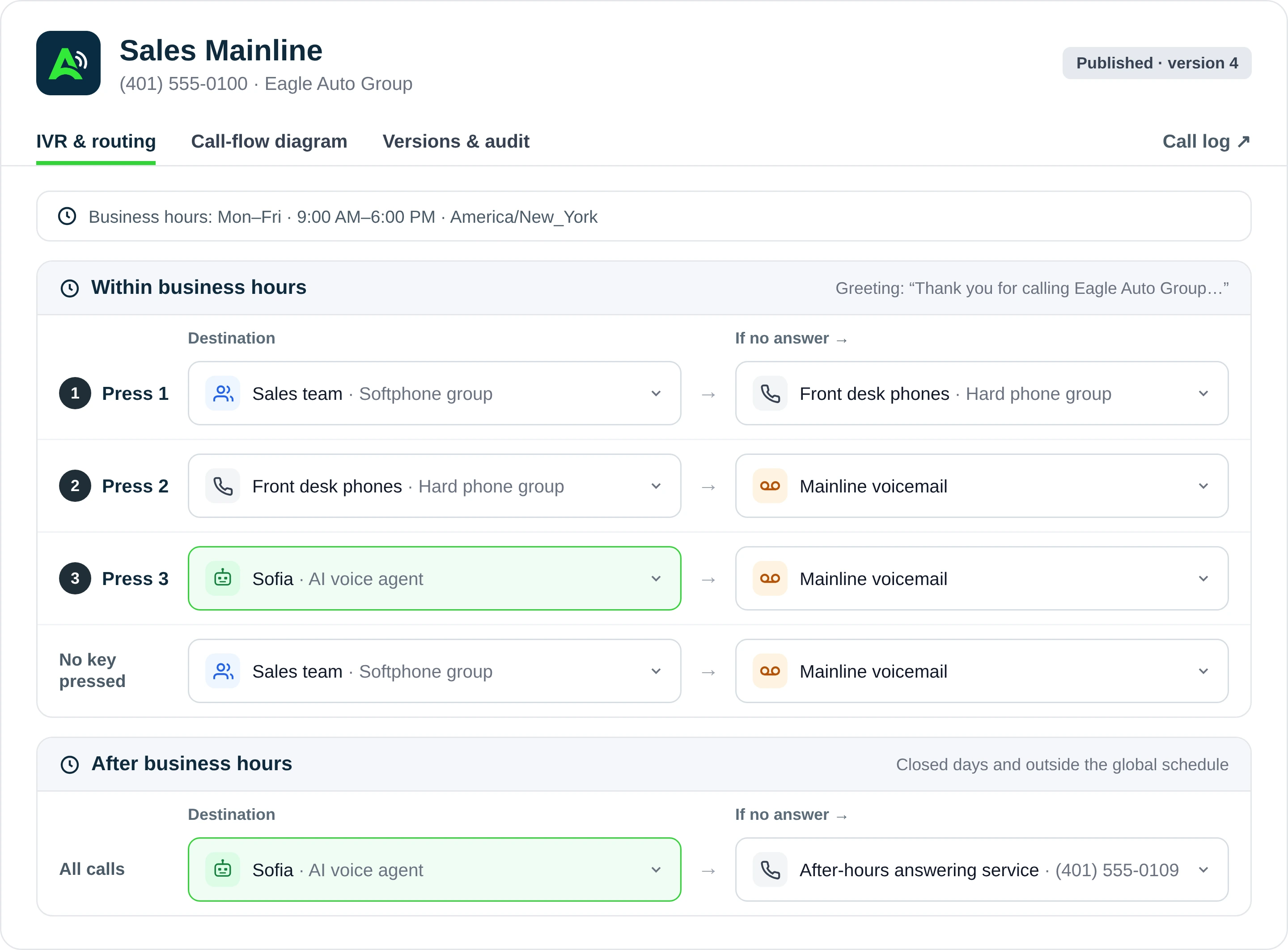
Build a call flow that sends callers to your sales desk, a teammate's phone, voicemail, a custom message, or an AI Voice Agent.
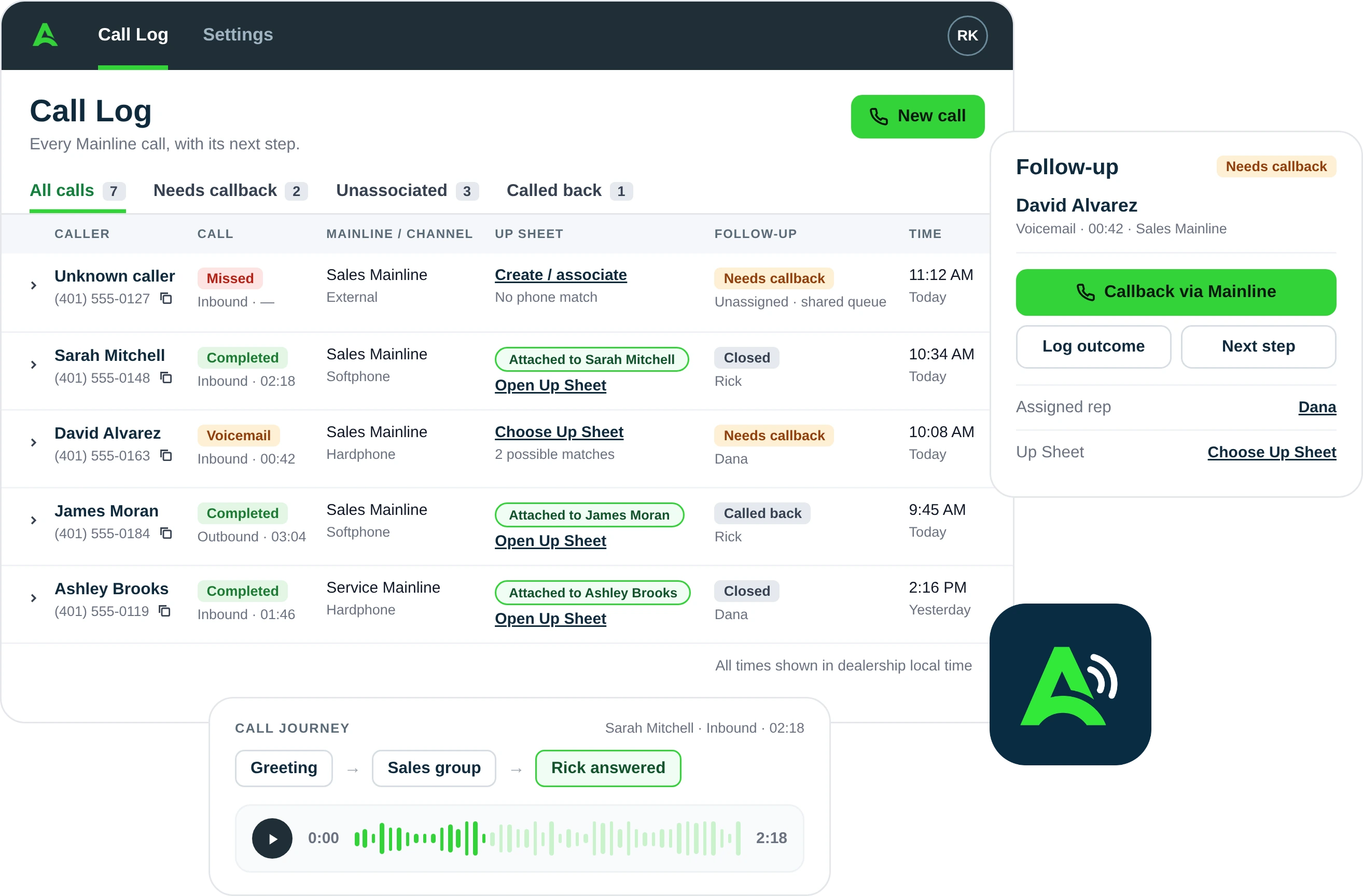
One Call Log, Tied to Your Leads
Caller, routing path, status, duration, and recording context, all in one log connected to the customer record your team already works from.
Business-Hours Routing
Route calls one way when you're open and another when you're closed, with a fallback ready for any call nobody picks up.
Chase Missed Calls and Close the Loop
Filter to calls that need a callback, dial the customer from your own phone, record the outcome, and mark it closed.
AI Voice Agent as a Destination
Send routine calls to an AI Voice Agent as one more option in your call flow, so a live rep only gets pulled in when it counts.
One Platform for Every Call, Every Lead, Every Rep
AutoRaptor Connect links your main business line directly to your CRM, so every call is logged where your team already works and is easy to tie to the right lead.
No new hardware to manage: AutoRaptor Connect routes calls to the phones your team already carries, a desk line, a cell phone, or both.
Setup handled by our team: Your Customer Success team configures the number, call flow, hours, and fallbacks, then tests every route before you go live.
Every call is logged in context: routing path, status, duration, and recording, when available, sit alongside your lead records.
Business hours built in: Calls route one way while you're open and another after close, so nothing rings into an empty desk.
An AI Voice Agent when you need one: Route routine calls to an AI Voice Agent as one more destination in the flow, without replacing your team.
You're Live in Days, Not Weeks
From connecting your number to your first routed call
Connect Your Number
Forward your current number, port it, or get a new one.
Build Your Call Flow & Hours
Set your greeting, add keypad options, choose where each one goes, and set how calls route when you're open, closed, or after hours.
Test and Go Live
Our team places a live test call to check every route and fallback before you launch.
Connected workflow
Built Because the Phone Is Still Where Deals Start
One Platform
Your main line, call log, and leads live in one system, so there's no separate phone vendor to manage
24/7 Routing
Calls follow your business hours, with a fallback ready for every call nobody picks up.
One Number
Forward it, port it, or get a new one. Customers keep calling the number they already know.
Explore more AutoRaptor
AutoRaptor Connect Works Better With
If this feature fits how your dealership sells, these related tools can help your team connect the next step.
AI Voice Agent
Route calls to an AI Voice Agent when you don't need a live rep on the line.
See featureUnified Communications
Keep every call, text, and email in the same inbox your team already uses.
See featureLead Management
Turn any call into a tracked lead with an Up Sheet created right from the call log.
See feature-
Meet the Dealership Team That Never Loses a Call
Independent dealerships use AutoRaptor to simplify their processes and keep more buyers moving
See reviews
4.6/5
1200+ reviews -
Jesse Hellem
Owner of 615 Auto Sales
“I interviewed 10 different CRM companies, and I don't see anyone else doing it quite like you guys are. One of the things I liked the most is that everything fell under the same umbrella: your CRM and AI fuse.”
-
Omar Haseeb
Owner of Ultimate Motorsport Inc
“The ROI is off the charts. We sell 85 to 100 cars a month with just three sales guys.”
Frequently Asked Questions About AutoRaptor Connect
Answers to common questions about how AutoRaptor Connect works.
AutoRaptor Connect is a dealership phone system that brings inbound calls to your main business number into AutoRaptor CRM. Calls follow a call flow you set up, every call is recorded in a central Call Log, and your team follows up from the same platform where you manage your leads.
AutoRaptor Connect currently handles inbound calls to your dealership's main phone line. When your team needs to call a customer back, they can select the number in the Call Log, which opens the dialer on their own phone.
Yes. You can forward your existing number to AutoRaptor Connect, port it to AutoRaptor, or get a new number through us. Forwarding may need your current carrier to turn it on at their end. Porting involves your carrier and a planned cutover window. Our Customer Success team will help you choose the right path.
Our Customer Success team configures your number, call flow, business hours, and fallback routes, then places a live test call to check every route before you go live. Timing depends on your number path. Forwarding or a new number is usually the quickest, and porting takes longer because it involves your current carrier. We'll confirm your timeline during onboarding.
No new desk phones are required. AutoRaptor Connect routes calls to phone numbers your team already uses, like your sales desk line or a teammate's cell. Each teammate verifies their phone number in AutoRaptor before it can receive routed calls. Depending on your setup, your current carrier may also need to apply call forwarding.
Every call to your main line shows up in the Call Log with the caller, routing path, status, and duration, plus a recording link when one is available. If the caller matches an existing Up Sheet, you'll see it right in the log. For new callers, your team can create an Up Sheet from the call entry, with the caller's number already filled in.
You choose a fallback for every route, such as voicemail, so unanswered calls still go somewhere. In the Call Log, your team can filter to calls that need a callback, call the customer from their own phone, record the outcome, and mark the call closed.
Ready to Bring Your Main Phone Line Into AutoRaptor?
Join independent dealerships using AutoRaptor Connect to route every call, log every conversation, and follow up from the same platform where they manage their leads.
Keep your current number
Setup done with our team
No new hardware
CRM-native call log
Resources
Learn More About AI for Dealerships
Why Missed Calls Cost Dealerships Real Sales
Phone leads are often your highest-intent buyers. Learn how always-on AI call answering helps capture demand before it moves to another dealership.
How AI Voice Fits Into Your Dealership CRM
See how call summaries, transcripts, qualification details, and next steps can live in the same CRM record your sales team already uses.
AI Voice Agent + AI Sales Assistant
Learn how AI-powered voice intake and automated email or SMS follow-up can work together to keep buyers engaged from first call to appointment.